The Edvocate

Top Menu

Main Menu

  • Start Here
    • Our Brands
    • Governance
      • Lynch Education Consulting, LLC.
      • Dr. Lynch’s Personal Website
      • Careers
    • Write For Us
    • Books
    • The Tech Edvocate Product Guide
    • Contact Us
    • The Edvocate Podcast
    • Edupedia
    • Pedagogue
    • Terms and Conditions
    • Privacy Policy
  • PreK-12
    • Assessment
    • Assistive Technology
    • Best PreK-12 Schools in America
    • Child Development
    • Classroom Management
    • Early Childhood
    • EdTech & Innovation
    • Education Leadership
    • Equity
    • First Year Teachers
    • Gifted and Talented Education
    • Special Education
    • Parental Involvement
    • Policy & Reform
    • Teachers
  • Higher Ed
    • Best Colleges and Universities
    • Best College and University Programs
    • HBCU’s
    • Diversity
    • Higher Education EdTech
    • Higher Education
    • International Education
  • Advertise
  • The Tech Edvocate Awards
    • The Awards Process
    • Finalists and Winners of The 2025 Tech Edvocate Awards
    • Finalists and Winners of The 2024 Tech Edvocate Awards
    • Finalists and Winners of The 2023 Tech Edvocate Awards
    • Finalists and Winners of The 2021 Tech Edvocate Awards
    • Finalists and Winners of The 2022 Tech Edvocate Awards
    • Finalists and Winners of The 2020 Tech Edvocate Awards
    • Finalists and Winners of The 2019 Tech Edvocate Awards
    • Finalists and Winners of The 2018 Tech Edvocate Awards
    • Finalists and Winners of The 2017 Tech Edvocate Awards
    • Award Seals
  • Apps
    • GPA Calculator for College
    • GPA Calculator for High School
    • Cumulative GPA Calculator
    • Grade Calculator
    • Weighted Grade Calculator
    • Final Grade Calculator
  • The Tech Edvocate
  • Post a Job
  • AI Powered Personal Tutor

logo

The Edvocate

  • Start Here
    • Our Brands
    • Governance
      • Lynch Education Consulting, LLC.
      • Dr. Lynch’s Personal Website
        • My Speaking Page
      • Careers
    • Write For Us
    • Books
    • The Tech Edvocate Product Guide
    • Contact Us
    • The Edvocate Podcast
    • Edupedia
    • Pedagogue
    • Terms and Conditions
    • Privacy Policy
  • PreK-12
    • Assessment
    • Assistive Technology
    • Best PreK-12 Schools in America
    • Child Development
    • Classroom Management
    • Early Childhood
    • EdTech & Innovation
    • Education Leadership
    • Equity
    • First Year Teachers
    • Gifted and Talented Education
    • Special Education
    • Parental Involvement
    • Policy & Reform
    • Teachers
  • Higher Ed
    • Best Colleges and Universities
    • Best College and University Programs
    • HBCU’s
    • Diversity
    • Higher Education EdTech
    • Higher Education
    • International Education
  • Advertise
  • The Tech Edvocate Awards
    • The Awards Process
    • Finalists and Winners of The 2025 Tech Edvocate Awards
    • Finalists and Winners of The 2024 Tech Edvocate Awards
    • Finalists and Winners of The 2023 Tech Edvocate Awards
    • Finalists and Winners of The 2021 Tech Edvocate Awards
    • Finalists and Winners of The 2022 Tech Edvocate Awards
    • Finalists and Winners of The 2020 Tech Edvocate Awards
    • Finalists and Winners of The 2019 Tech Edvocate Awards
    • Finalists and Winners of The 2018 Tech Edvocate Awards
    • Finalists and Winners of The 2017 Tech Edvocate Awards
    • Award Seals
  • Apps
    • GPA Calculator for College
    • GPA Calculator for High School
    • Cumulative GPA Calculator
    • Grade Calculator
    • Weighted Grade Calculator
    • Final Grade Calculator
  • The Tech Edvocate
  • Post a Job
  • AI Powered Personal Tutor
  • We Need an Attitude Adjustment: Looking at Adolescence in a Different Light

  • New Teacher Tip: Be a Superstar Teacher from Day One

  • New Teacher Tip: Avoid Procrastination

  • New Science of Leadership: It Only Takes 3 Things to Succeed

  • Never Too Small to Play: Designing Inclusive, Sensory-Rich Playgrounds for Children Birth to 5!

  • Nervous System Facts for Kids

  • Neptune Fun Facts for Kids

  • Neil Armstrong Facts For Kids

  • Navigating Your First Teaching Job: Tips and Advice for Success

  • Navigating Parent-Teacher Communication

EdTech & InnovationTeachers
Home›EdTech & Innovation›Teachers: How to Use Google Drive

Teachers: How to Use Google Drive

By Matthew Lynch
February 21, 2015
0
Spread the love

By Catlin Tucker

For teachers who are just getting started with Google, Google Drive can be intimidating! In preparation for a Google training, I’ve put together a short explanation of Google Drive and its basic features. Although an increasing number of people have a Gmail account, I run into teachers all the time who are not sure what Google Drive is or how it works.

Google Drive is like a big virtual bucket! It’s where everything you create with Google apps–documents, forms, sheets, slides, drawing–are stored. And unlike a traditional word processing document, you never need to click “Save”…EVER.  Your work is automatically saved every 5 seconds (or so).

Google Drive comes with 15 GB of free storage, so you can save files, photos, and videos. You can access any file in your Google Drive from any device as long as you have internet access. This means you are no longer tethered to a piece of hardware. You can open, edit and share files from any device that can get online.

For those with unreliable internet access, you can also install Google Drive onto your devices and work offline. Then when you are back online, your devices will sync and store your work!

Here are some screenshots to help you navigate your Google Drive.

Organize your files in whatever order makes sense to you. You can limit your view to the files you’ve created, the files that have been shared with you or the files that have been most recently edited. This makes it easy to locate the files you’re looking for.

Screen Shot 2015-01-20 at 2.47.26 PM


Click on a file or folder and check out the “More actions” icon (3 vertical dots) to manage your documents more easily.

Screen Shot 2015-01-20 at 3.28.31 PM


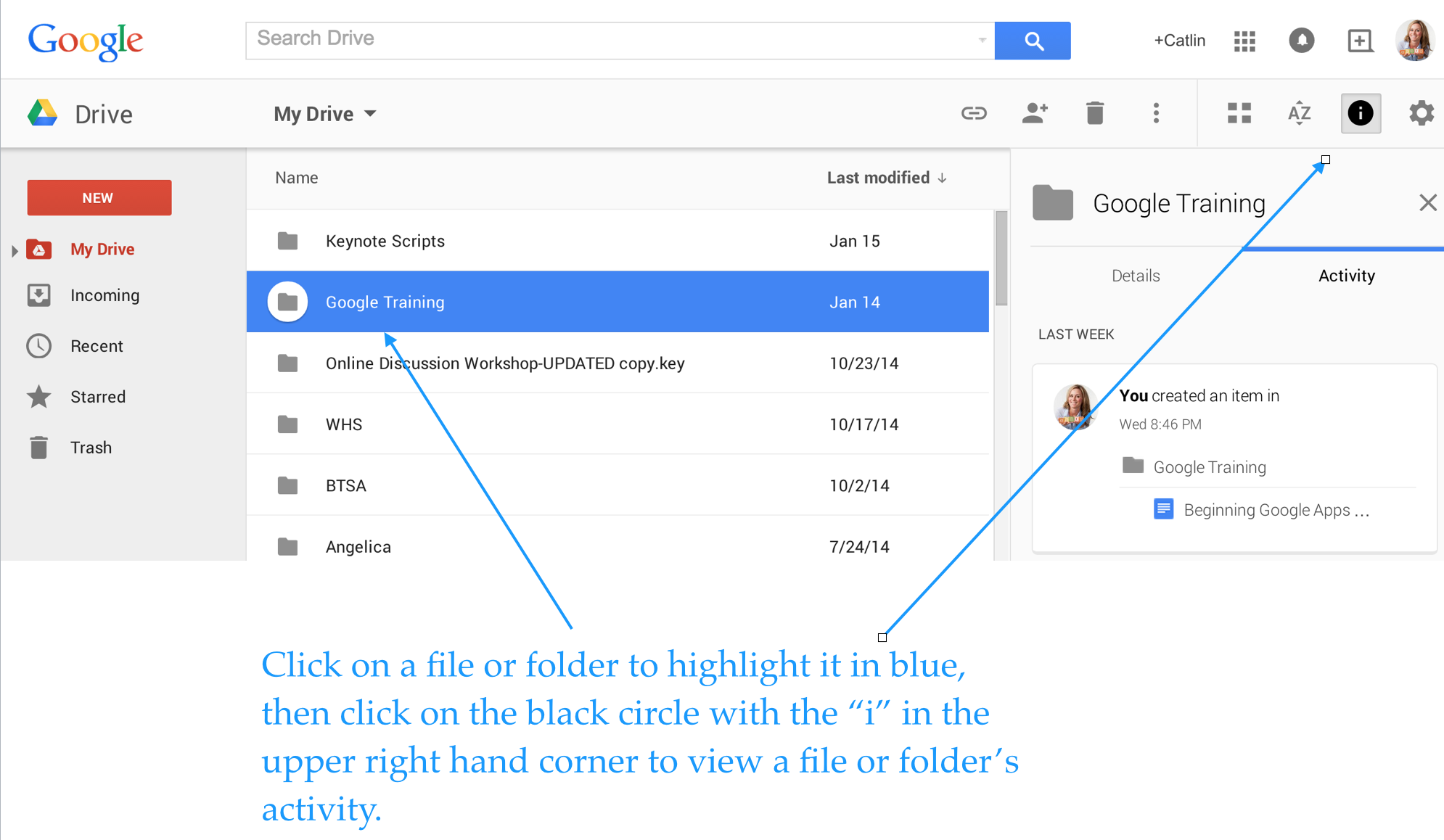
Enjoy total transparency with the “View Details” icon (black circle with the letter “i” in the middle). Simply click on a file or folder and see all of the activity associated with it. You can see when documents were created, when they were edited, and who edited them!
Screen Shot 2015-01-20 at 4.06.24 PM


Last, but not least, you can insert files, photos and videos directly from Google Drive into your emails.

Screen Shot 2015-01-20 at 1.34.37 PM


If you use Google Drive and have tips to share, please post a comment!


This post originally appeared on Catlin Tucker: Blended Learning & Technology in the Classroom and was republished with permission. 

Read all of our posts about EdTech and Innovation by clicking here. 

Tagsdigital technologyntchatreflective teacherteacher qualityteacheredteachers
Previous Article

More Than Half of U.S. Public School ...

Next Article

Is the U.S. Dropout Rate Really a ...

Matthew Lynch

Related articles More from author

  • EdTech & Innovation

    What fewer women in STEM means for their mental health

    February 24, 2016
    By Matthew Lynch
  • Matthew LynchTeachersTesting

    Three Handy Rubrics for Assessment Creation

    December 1, 2016
    By Matthew Lynch
  • Teachers

    Teachers: Do You Know the 4 Ways You Could Be Liable for Your Students’ Injuries?

    May 14, 2016
    By Matthew Lynch
  • Ask An ExpertEdTech & InnovationMatthew LynchPolicy & ReformTeachers

    6 Ways to Help K-12 Students Fall in Love with Learning

    January 11, 2016
    By Matthew Lynch
  • Policy & Reform

    5 Steps to Data-Based School Reform—the Common Sense Way

    February 14, 2016
    By Matthew Lynch
  • EdTech & InnovationTeachers

    4 Facts You Should Know About Gamifying K-12 Classrooms

    March 7, 2016
    By Matthew Lynch

Search

Registration and Login

  • Register
  • Log in
  • Entries feed
  • Comments feed
  • WordPress.org

Newsletter

Signup for The Edvocate Newsletter and have the latest in P-20 education news and opinion delivered to your email address!

RSS Matthew on Education Week

  • Au Revoir from Education Futures November 20, 2018 Matthew Lynch
  • 6 Steps to Data-Driven Literacy Instruction October 17, 2018 Matthew Lynch
  • Four Keys to a Modern IT Approach in K-12 Schools October 2, 2018 Matthew Lynch
  • What's the Difference Between Burnout and Demoralization, and What Can Teachers Do About It? September 27, 2018 Matthew Lynch
  • Revisiting Using Edtech for Bullying and Suicide Prevention September 10, 2018 Matthew Lynch

About Us

The Edvocate was created in 2014 to argue for shifts in education policy and organization in order to enhance the quality of education and the opportunities for learning afforded to P-20 students in America. What we envisage may not be the most straightforward or the most conventional ideas. We call for a relatively radical and certainly quite comprehensive reorganization of America’s P-20 system.

That reorganization, though, and the underlying effort, will have much to do with reviving the American education system, and reviving a national love of learning.  The Edvocate plans to be one of key architects of this revival, as it continues to advocate for education reform, equity, and innovation.

Newsletter

Signup for The Edvocate Newsletter and have the latest in P-20 education news and opinion delivered to your email address!

Contact

The Edvocate
910 Goddin Street
Richmond, VA 23230
(601) 630-5238
[email protected]
  • situs togel online
  • dentoto
  • situs toto 4d
  • situs toto slot
  • toto slot 4d
Copyright (c) 2025 Matthew Lynch. All rights reserved.