The Edvocate

Top Menu

Main Menu

  • Start Here
    • Our Brands
    • Governance
      • Lynch Education Consulting, LLC.
      • Dr. Lynch’s Personal Website
      • Careers
    • Write For Us
    • Books
    • The Tech Edvocate Product Guide
    • Contact Us
    • The Edvocate Podcast
    • Edupedia
    • Pedagogue
    • Terms and Conditions
    • Privacy Policy
  • PreK-12
    • Assessment
    • Assistive Technology
    • Best PreK-12 Schools in America
    • Child Development
    • Classroom Management
    • Early Childhood
    • EdTech & Innovation
    • Education Leadership
    • Equity
    • First Year Teachers
    • Gifted and Talented Education
    • Special Education
    • Parental Involvement
    • Policy & Reform
    • Teachers
  • Higher Ed
    • Best Colleges and Universities
    • Best College and University Programs
    • HBCU’s
    • Diversity
    • Higher Education EdTech
    • Higher Education
    • International Education
  • Advertise
  • The Tech Edvocate Awards
    • The Awards Process
    • Finalists and Winners of The 2026 Tech Edvocate Awards
    • Finalists and Winners of The 2025 Tech Edvocate Awards
    • Finalists and Winners of The 2024 Tech Edvocate Awards
    • Finalists and Winners of The 2023 Tech Edvocate Awards
    • Finalists and Winners of The 2021 Tech Edvocate Awards
    • Finalists and Winners of The 2022 Tech Edvocate Awards
    • Finalists and Winners of The 2020 Tech Edvocate Awards
    • Finalists and Winners of The 2019 Tech Edvocate Awards
    • Finalists and Winners of The 2018 Tech Edvocate Awards
    • Finalists and Winners of The 2017 Tech Edvocate Awards
    • Award Seals
  • Apps
    • GPA Calculator for College
    • GPA Calculator for High School
    • Cumulative GPA Calculator
    • Grade Calculator
    • Weighted Grade Calculator
    • Final Grade Calculator
  • The Tech Edvocate
  • Post a Job
  • AI Powered Personal Tutor

logo

The Edvocate

  • Start Here
    • Our Brands
    • Governance
      • Lynch Education Consulting, LLC.
      • Dr. Lynch’s Personal Website
        • My Speaking Page
      • Careers
    • Write For Us
    • Books
    • The Tech Edvocate Product Guide
    • Contact Us
    • The Edvocate Podcast
    • Edupedia
    • Pedagogue
    • Terms and Conditions
    • Privacy Policy
  • PreK-12
    • Assessment
    • Assistive Technology
    • Best PreK-12 Schools in America
    • Child Development
    • Classroom Management
    • Early Childhood
    • EdTech & Innovation
    • Education Leadership
    • Equity
    • First Year Teachers
    • Gifted and Talented Education
    • Special Education
    • Parental Involvement
    • Policy & Reform
    • Teachers
  • Higher Ed
    • Best Colleges and Universities
    • Best College and University Programs
    • HBCU’s
    • Diversity
    • Higher Education EdTech
    • Higher Education
    • International Education
  • Advertise
  • The Tech Edvocate Awards
    • The Awards Process
    • Finalists and Winners of The 2026 Tech Edvocate Awards
    • Finalists and Winners of The 2025 Tech Edvocate Awards
    • Finalists and Winners of The 2024 Tech Edvocate Awards
    • Finalists and Winners of The 2023 Tech Edvocate Awards
    • Finalists and Winners of The 2021 Tech Edvocate Awards
    • Finalists and Winners of The 2022 Tech Edvocate Awards
    • Finalists and Winners of The 2020 Tech Edvocate Awards
    • Finalists and Winners of The 2019 Tech Edvocate Awards
    • Finalists and Winners of The 2018 Tech Edvocate Awards
    • Finalists and Winners of The 2017 Tech Edvocate Awards
    • Award Seals
  • Apps
    • GPA Calculator for College
    • GPA Calculator for High School
    • Cumulative GPA Calculator
    • Grade Calculator
    • Weighted Grade Calculator
    • Final Grade Calculator
  • The Tech Edvocate
  • Post a Job
  • AI Powered Personal Tutor
  • Baffling New Studies Reveal the TRUTH About Screen Time Effects on Children

  • The Astonishing Reason CXOs Are Rushing to Master AI Now

  • This Game-Changing AI Nanny Software Will Transform Parenting — But At What Cost?

  • The Alarming Truth About AI and Your Job: What the WEF Really Says

  • This Looming Crisis Will Drastically Reshape Your Family’s Future

  • The Brutal Reality: 10 Harsh Truths About Life as a Single Mother No One Talks About

  • The AI Revolution in Education: 10 Astonishing Ways It’s Changing Everything (For Better or Worse)

  • Unprecedented Student Loan Forgiveness Crackdown: What You MUST Know Before 2026

  • Announcing the Winners of the 2026 Tech Edvocate Awards

  • Mind-Blowing: Meta Just Paid $16.68 Billion to Settle Social Media Addiction Claims

Uncategorized
Home›Uncategorized›Ving: The Ultimate CMS for Interactive Lessons & Student Tracking

Ving: The Ultimate CMS for Interactive Lessons & Student Tracking

By Matthew Lynch
September 7, 2016
0
Spread the love

Ving is a powerful web-based content management tool for teachers who want to create interactive lessons with multimedia and assessment tools.  Suffice it to say, Ving is not your typical content management system due to its ability to track student progress and integrate with Google Drive and Classroom.  Ving and Google Classroom work perfectly together to create a powerful content and learning management system.   Ving also solves an age-old problem educators have faced when utilizing a LMS (Learning Management System) or CMS (Content Management System) . . . the inability to track the time a student spent watching a video, reading a document or completing a quiz. Ving is unique because it tracks student progress as they work through your lesson content and provides useful analytics.  Essentially, Ving is the perfect tool for blended or flipped learning for any learning environment. I recently utilized Ving in an actual classroom situation and here I share my impressions on the usefulness and usability of this tool.

How Ving Works

Ving allows educators to upload their own resources into a content management system and then track students in real-time as they work through videos, quizzes, articles and audio clips.  From the moment a student starts interacting with an assignment an educator can track a student’s progress real-time.

Ving works on any device and teachers have the ability to email or post assignments from “Google Classroom, student portals, and social media pages”. Ving features a user interface where teachers can upload any combination of videos, audios, documents, images directly from their computer or Google Drive. Equally impressive is the ability to create quizzes and surveys for assessment.

Other useful features are the ability to save your Ving as a template in Google Drive to be used in future assessments or by another educator.  The template feature allows for collaboration and sharing between teachers, school districts and beyond.  Also, the ability to sync Google contacts with Ving is a huge time-saver when inviting students to your Ving. Finally, student analytics can be easily exported in Excel or CSV format for recording keeping.

Getting Started with Ving

Sign up was almost effortless as I was able to link Ving directly to Google Apps for Education account with a few clicks.  I immediately appreciated Ving’s clean interface as It provided easy access to the Home, Inbox, Shared and Draft Icons. A quick look around and I was ready to jump in!  With a click on the  “+New Ving” button I was directed to the highly intuitive content interface and then dived right into creating my first assignment.

Content Management Interface
Ving 1

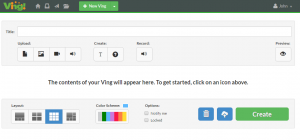
Ving’s simple interface had me uploading lesson files in no time.  As Ving integrates with Google Drive I was able to upload photos, videos and audio clips from the cloud effortlessly.  Several documents essential to my lesson were on my Windows PC, no problem, Ving provides the capability to upload content directly from my computer.  I was preparing a lesson on the use of binary in computing for my high school computer science course and uploaded several videos, a PDF document and images.  Additionally, I recorded a voice file for instructions on how to complete the module.  Finally, I created a quiz to assess their knowledge on my newly minted lesson materials.  With a simple click on a “+” button I was able to choose from 6 question types include True/False, Yes/ No, Multiple Choice, Multiple Response, Likert Scale and Short Answer.

I post all my teaching materials on Google Classroom however it often becomes cluttered with videos, documents and other course related information.  Ving to the rescue!  I simply create a self-contained module with all my learning resources and post the link in Google Classroom thus avoiding clutter and streamlining a student’s viewing experience.  Shortly after implementing Ving in my teaching practice students commented on how they enjoyed having all the learning content available in one Ving.  It made sorting through Google Classroom a less daunting task.

Creatively, Ving has several useful options as well including the ability to customize the resource layout via a selection of different grid types and color schemes.  I was able to reorder my resources with easy drag-and-drop functionality.  It was time to click on “Create” and bring my Ving to life,

Using the Analytics Interface
Ving 2

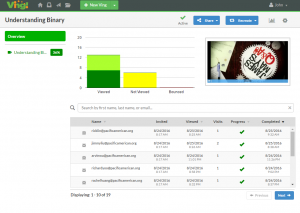
After creating my Ving I clicked “Share” and was ready to invite students via my Google contacts.  Previously, I had created a contact list for my Computer Science course in Gmail and was able to send a Ving invite with one simple group email.  Additionally, I found that I needed to make some edits after my Ving was published.  In this particular case I was able to take advantage of Ving’s “revise” feature which allowed me to add a PDF document and edit my active, shared Ving without my students being the wiser!

Student Experience and Real-Time Analytics

As my Computer Science students worked through the lesson content they received a green check mark as they completed viewing videos, documents, audio and quizzes. I received an email that my students were working on the Ving and could track real time as they worked through the modules. Most importantly I was able to see how much time they dedicated to each module. Finally, I was able export student results via Excel or CSV format. 

A Powerful, Flexible Solution to Content Management

Ving is a much needed tool for blended or flipped learning environments due to its ability to track student analytics as they progress through teacher provided multimedia, documents and quizzes.  It only takes moments for an educator to gain insight into which students’ lack engagement and motivation.  As this academic year progresses I’m looking forward to creating and organizing my future teaching units with Ving.  I recently demonstrated Ving to other teachers and they are extremely excited to use the platform in their own teaching practice due to its ease of use and its ability to enhance Google Classroom.

There are several features that I hope the developers will upgrade in the near future.  For instance, when creating a quiz, I couldn’t select the correct answer and later realized that I would need to self-grade quizzes.  An automatic grading feature will enhance Ving greatly.  In terms of summative assessments integrating Google Forms into their platform would be incredibly powerful as well. Additionally, there is a small-learning curve when using Ving, therefore the existence of a help button located directly in the interface would be helpful rather than burying it in the menu section.  That being said, the Ving team enlists the use of email to provide its users with timely hints and suggestions.

In closing, Ving is truly innovative and a must-have tool for any educator and has the capability to vastly improve one’s teaching practice.  It has greatly improved the Google Classroom experience for my students. The web-based tool greatly enhances the ability to flip your teaching practice with its ability to track student progress and time spent watching a video, reading a document, listening to audio or taking a quiz.  I will enthusiastically be recommending Ving to my fellow educators.

To kick off your communication this school year sign up for your FREE trial of Ving here. It is time to start using a tool that allows you to be in control of your communication and start knowing what is and isn’t working at your school.

Ving


Tagscommunication techEdtechving
Previous Article

We Help Education Related Companies Promote Themselves

Next Article

The Evidence-Based Athletic Department

Matthew Lynch

Related articles More from author

  • Early Childhood & K-12 EdTechEdTech & Innovation

    Edtech’s Ideal User Interface Requires More Than Simplicity

    May 15, 2017
    By Matthew Lynch
  • Early Childhood & K-12 EdTechHigher Education EdTechTrending Topics

    9 Steps to Keep Student Data Safe

    June 30, 2017
    By Matthew Lynch
  • Uncategorized

    ASB Online School Case Study: Enhancing Learning with VHS Courses

    May 22, 2017
    By Matthew Lynch
  • Higher Education

    Is it time to eliminate tenure for professors?

    March 11, 2017
    By Matthew Lynch
  • EdTech & InnovationTrending Topics

    16 Apps that Support the Creative Process

    May 27, 2017
    By Matthew Lynch
  • The Tech Edvocate

    Top 5 Apps for Teacher Communication

    January 22, 2017
    By Matthew Lynch

Search

Registration and Login

  • Log in
  • Entries feed
  • Comments feed
  • WordPress.org

Newsletter

Signup for The Edvocate Newsletter and have the latest in P-20 education news and opinion delivered to your email address!

RSS feed: Matthew on Education Week Matthew on Education Week

  • Au Revoir from Education Futures November 20, 2018 Matthew Lynch
  • 6 Steps to Data-Driven Literacy Instruction October 17, 2018 Matthew Lynch
  • Four Keys to a Modern IT Approach in K-12 Schools October 2, 2018 Matthew Lynch
  • What's the Difference Between Burnout and Demoralization, and What Can Teachers Do About It? September 27, 2018 Matthew Lynch
  • Revisiting Using Edtech for Bullying and Suicide Prevention September 10, 2018 Matthew Lynch

About Us

The Edvocate was created in 2014 to argue for shifts in education policy and organization in order to enhance the quality of education and the opportunities for learning afforded to P-20 students in America. What we envisage may not be the most straightforward or the most conventional ideas. We call for a relatively radical and certainly quite comprehensive reorganization of America’s P-20 system.

That reorganization, though, and the underlying effort, will have much to do with reviving the American education system, and reviving a national love of learning.  The Edvocate plans to be one of key architects of this revival, as it continues to advocate for education reform, equity, and innovation.

Newsletter

Signup for The Edvocate Newsletter and have the latest in P-20 education news and opinion delivered to your email address!

Contact

The Edvocate
910 Goddin Street
Richmond, VA 23230
(601) 630-5238
[email protected]
  • situs togel online
  • dentoto
  • situs toto 4d
  • situs toto slot
  • toto slot 4d
Copyright (c) 2026 Matthew Lynch. All rights reserved.