The Edvocate

Top Menu

Main Menu

  • Start Here
    • Our Brands
    • Governance
      • Lynch Education Consulting, LLC.
      • Dr. Lynch’s Personal Website
      • Careers
    • Write For Us
    • Books
    • The Tech Edvocate Product Guide
    • Contact Us
    • The Edvocate Podcast
    • Edupedia
    • Pedagogue
    • Terms and Conditions
    • Privacy Policy
  • PreK-12
    • Assessment
    • Assistive Technology
    • Best PreK-12 Schools in America
    • Child Development
    • Classroom Management
    • Early Childhood
    • EdTech & Innovation
    • Education Leadership
    • Equity
    • First Year Teachers
    • Gifted and Talented Education
    • Special Education
    • Parental Involvement
    • Policy & Reform
    • Teachers
  • Higher Ed
    • Best Colleges and Universities
    • Best College and University Programs
    • HBCU’s
    • Diversity
    • Higher Education EdTech
    • Higher Education
    • International Education
  • Advertise
  • The Tech Edvocate Awards
    • The Awards Process
    • Finalists and Winners of The 2026 Tech Edvocate Awards
    • Finalists and Winners of The 2025 Tech Edvocate Awards
    • Finalists and Winners of The 2024 Tech Edvocate Awards
    • Finalists and Winners of The 2023 Tech Edvocate Awards
    • Finalists and Winners of The 2021 Tech Edvocate Awards
    • Finalists and Winners of The 2022 Tech Edvocate Awards
    • Finalists and Winners of The 2020 Tech Edvocate Awards
    • Finalists and Winners of The 2019 Tech Edvocate Awards
    • Finalists and Winners of The 2018 Tech Edvocate Awards
    • Finalists and Winners of The 2017 Tech Edvocate Awards
    • Award Seals
  • Apps
    • GPA Calculator for College
    • GPA Calculator for High School
    • Cumulative GPA Calculator
    • Grade Calculator
    • Weighted Grade Calculator
    • Final Grade Calculator
  • The Tech Edvocate
  • Post a Job
  • AI Powered Personal Tutor

logo

The Edvocate

  • Start Here
    • Our Brands
    • Governance
      • Lynch Education Consulting, LLC.
      • Dr. Lynch’s Personal Website
        • My Speaking Page
      • Careers
    • Write For Us
    • Books
    • The Tech Edvocate Product Guide
    • Contact Us
    • The Edvocate Podcast
    • Edupedia
    • Pedagogue
    • Terms and Conditions
    • Privacy Policy
  • PreK-12
    • Assessment
    • Assistive Technology
    • Best PreK-12 Schools in America
    • Child Development
    • Classroom Management
    • Early Childhood
    • EdTech & Innovation
    • Education Leadership
    • Equity
    • First Year Teachers
    • Gifted and Talented Education
    • Special Education
    • Parental Involvement
    • Policy & Reform
    • Teachers
  • Higher Ed
    • Best Colleges and Universities
    • Best College and University Programs
    • HBCU’s
    • Diversity
    • Higher Education EdTech
    • Higher Education
    • International Education
  • Advertise
  • The Tech Edvocate Awards
    • The Awards Process
    • Finalists and Winners of The 2026 Tech Edvocate Awards
    • Finalists and Winners of The 2025 Tech Edvocate Awards
    • Finalists and Winners of The 2024 Tech Edvocate Awards
    • Finalists and Winners of The 2023 Tech Edvocate Awards
    • Finalists and Winners of The 2021 Tech Edvocate Awards
    • Finalists and Winners of The 2022 Tech Edvocate Awards
    • Finalists and Winners of The 2020 Tech Edvocate Awards
    • Finalists and Winners of The 2019 Tech Edvocate Awards
    • Finalists and Winners of The 2018 Tech Edvocate Awards
    • Finalists and Winners of The 2017 Tech Edvocate Awards
    • Award Seals
  • Apps
    • GPA Calculator for College
    • GPA Calculator for High School
    • Cumulative GPA Calculator
    • Grade Calculator
    • Weighted Grade Calculator
    • Final Grade Calculator
  • The Tech Edvocate
  • Post a Job
  • AI Powered Personal Tutor
  • The AI Parenting Revolution: Are We Trading Connection For Convenience?

  • Shocking: Kids in Crisis Face More Emergency Holds and Restraints — What Every Parent Needs to Know Now

  • Urgent: New Study Reveals Alarming Truth About Toddler Screen Time — You Won’t Believe What It Does to Their Brains

  • New Research: This Is the Real Reason AI Cheating in Schools Is Exploding

  • This Game-Changing Bill Could Completely Transform Your Kids’ Financial Future

  • Americans of all ages want more federal help with childcare costs. Gen Z most of all.

  • Dramatic Shift: This New School Choice Program Could Redefine Education Funding

  • Outrageous: Biden Admin Quietly Killing Key Student Loan Program — Here’s How

  • Know a Middle Grade Reader Who Needs a Great New Book

  • This One Bill Could Drastically Reshape Custody Battles for Millions of Parents

EdTech & Innovation
Home›EdTech & Innovation›Tips for Using iPads in the Classroom

Tips for Using iPads in the Classroom

By Matthew Lynch
March 19, 2017
0
Spread the love

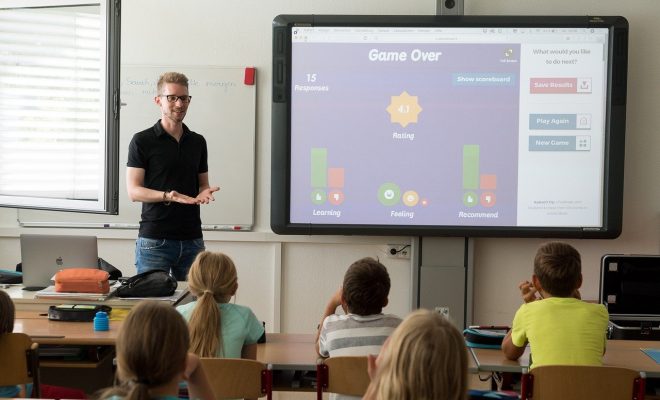
In 2010, Steve Jobs announced the release of the iPad. Since this date, iPads have flooded into the workplace, the home, and the classroom. But, do these touch screens bring with them education qualities or are they just flashy gadgets?  Open Colleges states that 81% of U.S teachers think that tablets can enrich the educational experience and that students believe so too. So, if iPads have a benefit in the classroom, we need to start looking for ways on how to introduce them into the classroom and make sure that they work. This means setting rules, using the best Edtech and making sure that the iPad is used to its full potential.

 Eliminate Distractions

With free apps, online games and a world of content; iPads can offer too much of a good thing for learners. As an educator, this can be combatted by creating lessons plans that do not allow a moment for distracting or by downloading an app like ClearLock. This app allows teachers and parents to lock certain apps for a period. This ensures that all learners are only able to access the same apps at the same time and that they distractions are limited.

Live feedback

If every child is afforded the chance to have an iPad in the classroom, it can be used as great tool to gain live feedback. Shy and students with problems may feel more inclined to reach out in the privacy of their iPad accounts. This not only allows educators the space to tailor their feedback but provides insight into classroom statistics. Students no longer have to wait days for homework corrections, which in turn allows students and teachers to the chance to address problems as they arise.

Take a virtual field trip

Field trips are expensive and drown teachers in admin. With apps such as Google Maps, students can explore exotic parts of the world. Lesson plans can be centered around a particular location or let the students explore. The White House, zoos and art galleries offer virtual tours and 360-degree camera options. These apps are usually accompanied by worksheets and quizzes, allowing the classroom to morph into the Louvre.

 Connecting outside of the classroom

Half of the nation’s school districts use some sort of e-readers, and yet they are barely used outside of the classroom. While not all students are authorized to take their iPads home, those that can be engaging with the content outside of the classroom. Homework not only allows students more time with the class content but encourages them to connect with other students, videos that provide different explanations and abilities to upload assignments. This virtual connection is necessary if technology is to be successfully used.

Use the multimedia opportunities

iPads bring with them opportunities away from the traditional textbooks. The use of videos, audio, and Edtech products are opening doors for kinetic and visual learners. Educators need to offer students real opportunities to engage with the technology in their hands. iPads have built-in cameras, speakers, and other features, and if they are not being used, there is no point to including them in the experience. Specific edtech products allow educators to focus the features of the iPad that will be utilized in lessons. EdSurge is a great place to find a list of Edtech products that are compatible with iPads.

Displaying Digital Creations

The classroom, as a physical space is important for social interaction. iPads can be very solitary and as colorful as the online world may be, classrooms need to be just as decorated. The displaying of art, achievements, and inspiration is particularly important in younger grades as it creates a space that is conducive to learning and pride. Apps such as Printopia allow students to connect to printers at home or school. This app is equally useful for teachers who want to print out posters or charts.

Technology brings with it exciting uses, but without preparation and realistic expectations, it also can fail in the most organized classroom. Educators need to have a reason to use an iPad and in turn, understand the new problems and procedures that come with it. Using an iPad may be a great education tool, but it needs to be milked for all it is worth if it is to make a difference in the classroom.




TagsEdtechedtechchatelearningSTEAMSTEM
Previous Article

How Does Gamification Effect the Learning Process?

Next Article

How Technology Can Benefit Physical Education Classes

Matthew Lynch

Related articles More from author

  • Higher EducationK-12

    The A-Z of Education Blogs: Letters S-TC

    May 10, 2017
    By Matthew Lynch
  • Education LeadershipEducation News

    Unlock Student Potential: The Future of Genetics in Learning

    May 25, 2017
    By Matthew Lynch
  • The Tech Edvocate

    Gamify Your Classroom: Boost Engagement with Social Media

    January 23, 2017
    By Matthew Lynch
  • Digital & Mobile TechnologyEarly Childhood & K-12 EdTechHigher EducationTrending Topics

    Mobile Phones: Disrupting Education in Africa (2023 Study)

    June 7, 2017
    By Matthew Lynch
  • STEM

    How Early Should Kids Begin STEM Education?

    May 22, 2018
    By Matthew Lynch
  • Digital & Mobile TechnologyEarly Childhood & K-12 EdTech

    8 Must Have Digital Citizenship Apps, Tools, and Resources

    October 26, 2017
    By Matthew Lynch

Search

Registration and Login

  • Log in
  • Entries feed
  • Comments feed
  • WordPress.org

Newsletter

Signup for The Edvocate Newsletter and have the latest in P-20 education news and opinion delivered to your email address!

RSS feed: Matthew on Education Week Matthew on Education Week

  • Au Revoir from Education Futures November 20, 2018 Matthew Lynch
  • 6 Steps to Data-Driven Literacy Instruction October 17, 2018 Matthew Lynch
  • Four Keys to a Modern IT Approach in K-12 Schools October 2, 2018 Matthew Lynch
  • What's the Difference Between Burnout and Demoralization, and What Can Teachers Do About It? September 27, 2018 Matthew Lynch
  • Revisiting Using Edtech for Bullying and Suicide Prevention September 10, 2018 Matthew Lynch

About Us

The Edvocate was created in 2014 to argue for shifts in education policy and organization in order to enhance the quality of education and the opportunities for learning afforded to P-20 students in America. What we envisage may not be the most straightforward or the most conventional ideas. We call for a relatively radical and certainly quite comprehensive reorganization of America’s P-20 system.

That reorganization, though, and the underlying effort, will have much to do with reviving the American education system, and reviving a national love of learning.  The Edvocate plans to be one of key architects of this revival, as it continues to advocate for education reform, equity, and innovation.

Newsletter

Signup for The Edvocate Newsletter and have the latest in P-20 education news and opinion delivered to your email address!

Contact

The Edvocate
910 Goddin Street
Richmond, VA 23230
(601) 630-5238
[email protected]
  • situs togel online
  • dentoto
  • situs toto 4d
  • situs toto slot
  • toto slot 4d
Copyright (c) 2026 Matthew Lynch. All rights reserved.